
Keeping a close eye on your SQL Server environment is essential for tracking CPU, memory and performance metrics while avoiding unexpected downtime. Regular monitoring allows database administrators to spot trends early, understand resource consumption patterns, and address problems before they escalate into larger outages.
By tracking key indicators such as CPU load, memory allocation, disk activity, and network throughput, teams can pinpoint bottlenecks related to slow queries, inefficient execution plans, or blocking sessions. This proactive approach helps ensure that databases continue to run smoothly as workloads grow and change over time.
July is Database Health Monitor Month!
July has arrived, and it’s time to turn our attention to the heartbeat of our digital world – our databases! As the founder of Database Health and Stedman Solutions, I’m thrilled to proclaim this month as Database Health Monitor Month! This is our annual chance to celebrate the unsung heroes safeguarding our precious data and to explore the intricate web of data structures and relationships within our systems. Let’s take a closer look at their health, uncover hidden issues, boost performance, and ensure our data highways are running seamlessly. This July, let’s commit to not just keeping our databases operational, but ensuring they thrive at peak performance!
This month also marks the anniversary of Database Health Monitor. To celebrate, I’m excited to offer 25% off the licensing fee for the annual subscription to Database Health Monitor. Don’t miss this opportunity to enhance your database management!
Monitoring is another important preventative measure that can help ensure the ongoing health and performance of a SQL Server. Administrators should monitor various performance metrics such as CPU usage, memory usage, disk usage, and network traffic to identify performance bottlenecks and potential issues. Monitoring can also help detect and resolve issues related to query performance, execution plans, and blocking sessions.
Database Health Monitor is the tool that I have built over the last dozen years in order to do this type of monitoring and to get a better understanding for how your databases are working.
Here are a couple examples of the reports that I use when I am trying to find out why things are running slow. Do you want to schedule a CPU intensive job and need to find the right time during the day to run it, this report can help with that.
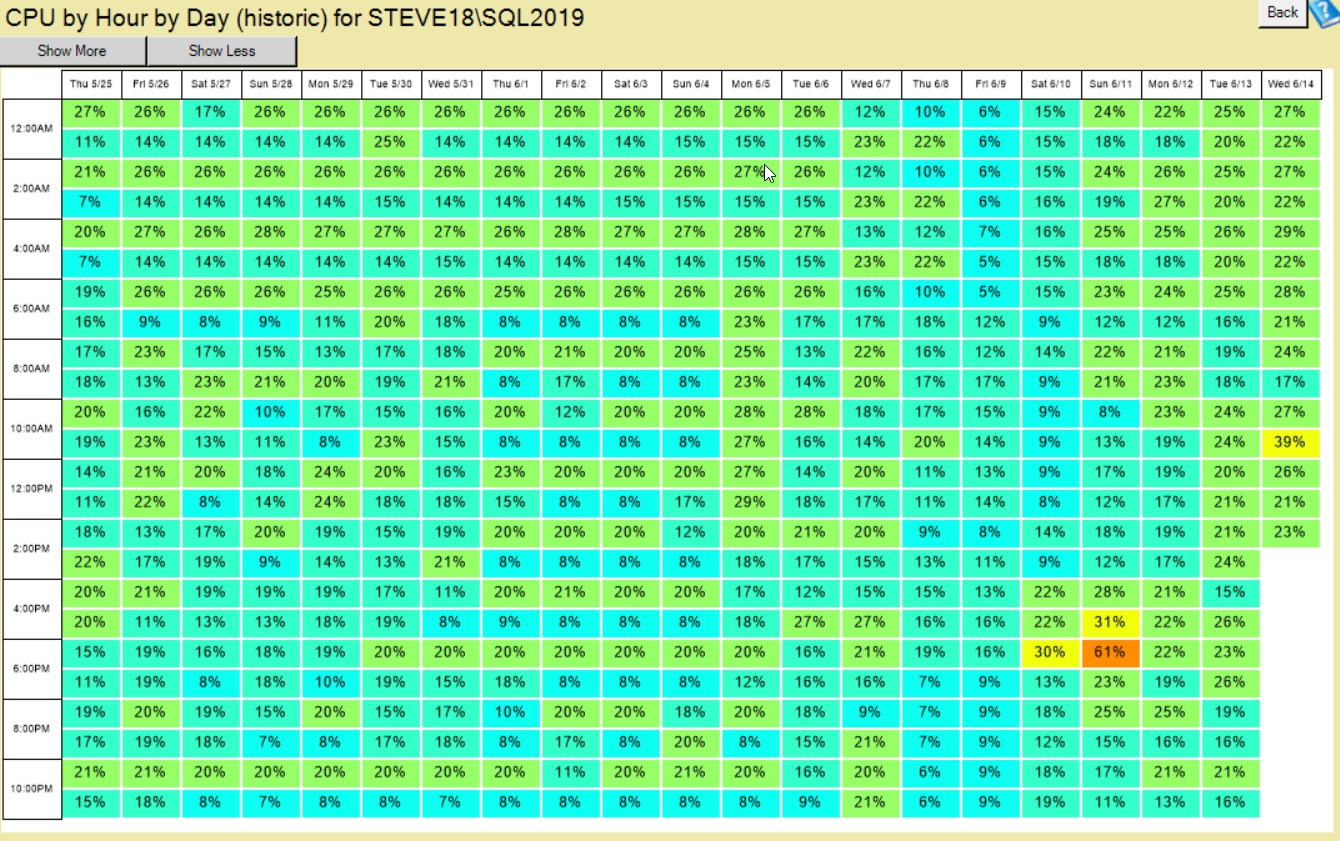
The CPU by hour report is great to see the overall CPU utliization averaged out on an hour by hour basis. It is a heat map type report where the larger percentabes are show in in colors closer to red and the smaller numbers are in green.

The memory report is great to find out what SQL server has actually allocated its memory to. Is it a big database, or even worse does a big database only get a tiny amount of memory. This report is handy to help show if a server is doing great with its currrent memory allocation or if it is in need of an increase in memory.
The course comes with licensing for 10 or 20 SQL Servers, and at 25% off it is a great deal if you purchase this month.
Get 25% Off Database Health Monitor Course in July!
Coupon Code: JULY25Learn how to monitor your Wait Statistics, you blocking queries, and to find out the best ways to improve performance with what you learn.
 Check out this offer:Explore our Database Health Monitor special pricing.

Here are all the discounts for Database Health Monitor. Pick the one that fits your server count.
25% off 1 Instance – Code: 25OFF1
25% off 10 Instances – Code: JULY25
25% off 20 Instances – Code: 25OFF20 – Best Value
Free SQL Server Replication Course
Start Database Health Monitor Month with one of our most valuable training offers. Purchase a new one-year subscription to Database Health Monitor between July 1st and July 7th and receive our SQL Server Replication Course absolutely free. This comprehensive course covers snapshot, transactional, and merge replication, helping you better understand, manage, and troubleshoot replication environments. Whether you are maintaining existing replication or planning a new deployment, this course provides practical, real-world knowledge that can save hours of frustration. A $499.99 value included at no additional cost.
More from Stedman Solutions:

Steve and the team at Stedman Solutions are here for all your SQL Server needs.
Contact us today for your free 30 minute consultation..
We are ready to help!