What you hear the term exclude Join SQL what do you think about?
When working with SQL Server, one of the common tasks in database queries is comparing two sets of data to identify differences or similarities. While SQL Server doesn’t explicitly have an “Exclude Join,” the concept refers to a query pattern used to find rows in one table that do not have a corresponding match in another table. This is typically accomplished using an anti-join approach.
In this article, we’ll explore what an exclude join is, how to implement it in SQL Server, and some practical examples.
Understanding the Concept
An exclude join essentially retrieves rows from one table that are not present in another. For example, if you have two tables—TableA and TableB—and want to find rows in TableA that are not in TableB, an exclude join is what you’re looking for.
This is commonly used for:
- Identifying orphan records
- Debugging data discrepancies
- Filtering data sets
Implementing an Exclude Join
1. Using NOT EXISTS
The NOT EXISTS operator is a common and efficient way to implement an exclude join. It checks whether a subquery returns any rows and filters out those that do.
SELECT a.*
FROM TableA a
WHERE NOT EXISTS (
    SELECT 1
    FROM TableB b
    WHERE a.ID = b.ID
);
- Explanation: This query selects rows from
TableAwhere no matchingIDexists inTableB.
2. Using LEFT JOIN with NULL Check
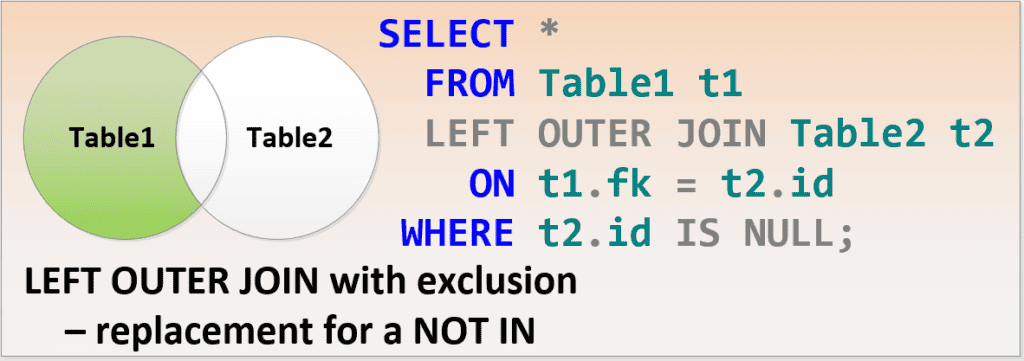
Another approach is using a LEFT JOIN and filtering for rows where the joined table has NULL values. This indicates that no match was found in the second table.
SELECT a.*
FROM TableA a
LEFT JOIN TableB b
ON a.ID = b.ID
WHERE b.ID IS NULL;
- Explanation: The
LEFT JOINensures all rows fromTableAare included. TheWHERE b.ID IS NULLcondition excludes rows where a match was found inTableB.
3. Using EXCEPT
SQL Server’s EXCEPT operator can also be used to implement an exclude join. It returns rows from the first query that are not present in the second.
SELECT ID
FROM TableA
EXCEPT
SELECT ID
FROM TableB;
- Explanation: This query compares the result sets of
TableAandTableB, returning only the rows that exist inTableAbut not inTableB.
Performance Considerations
Choosing the Right Approach
- Use
NOT EXISTSwhen working with smaller tables or when the filtering logic in the subquery is simple. - Use
LEFT JOINfor larger tables where an indexed join condition can optimize performance. - Use
EXCEPTfor straightforward comparisons, particularly when dealing with large datasets.
Indexing Matters
Proper indexing on the join columns (ID in the examples) can significantly improve query performance. Ensure indexes are in place to avoid full table scans, especially with large datasets.
Practical Example: Orphan Records
Imagine you have a database with two tables:
Customers: Contains all customer records.Orders: Contains records of orders placed by customers.
To find customers who have not placed any orders, you can use the exclude join concept.
Using NOT EXISTS:
SELECT c.CustomerID, c.CustomerName
FROM Customers c
WHERE NOT EXISTS (
    SELECT 1
    FROM Orders o
    WHERE c.CustomerID = o.CustomerID
);
Using LEFT JOIN:
SELECT c.CustomerID, c.CustomerName
FROM Customers c
LEFT JOIN Orders o
ON c.CustomerID = o.CustomerID
WHERE o.CustomerID IS NULL;
Both approaches yield the same result: a list of customers without corresponding orders.
Conclusion
While SQL Server doesn’t have a native “Exclude Join” keyword, the concept is easily implemented using NOT EXISTS, LEFT JOIN with NULL filtering, or the EXCEPT operator. Each method has its strengths, and the choice depends on the specific use case and performance considerations.
Understanding how to implement an exclude join is essential for tasks like identifying orphaned records, comparing datasets, and ensuring data consistency. If you’d like help optimizing your SQL Server queries or addressing performance challenges, reach out to Stedman Solutions—we’re here to help!
Getting Help from Steve and the Team
Contact us for your Free 30 minute consultation ORschedule your appointment now.