T-SQL: A Simple Example Using a Cursor

In SQL Server the cursor is a tool that is used to iterate over a result set, or to loop through each row of a result set one row at a time. It may not be the best way to work with a set of data, but if you need to loop row by agonizing row (RBAR) in a T-SQL script then a cursor is one way of doing it.

Note: If you are new to SQL Server and come from an Oracle background, you should know that cursors on SQL Server are different from those on Oracle.

Before creating the cursor, we will just start with a simple query that will end up being used in the cursor.


USE AdventureWorks2008;
GO

SELECT BusinessEntityID, Name
 FROM Sales.Store;

Which looks something like this:

SimpleCursor1

Now to convert it to a cursor, instead of just a select statement.

Step 1: Declare variables to hold the output from the cursor.

</p>
DECLARE @BusinessEntityID as INT;
DECLARE @BusinessName as NVARCHAR(50);

Step 2: Declare the cursor object;


DECLARE @BusinessCursor as CURSOR;

Step 3: Assign the query to the cursor.


SET @BusinessCursor = CURSOR FOR
SELECT BusinessEntityID, Name
 FROM Sales.Store;

Step 4: Open the cursor.


OPEN @BusinessCursor;

Step 5: Fetch the first row.


FETCH NEXT FROM @BusinessCursor INTO @BusinessEntityID, @BusinessName;

Step 5: Loop until there are no more results.  In the loop print out the ID and the name from the result set and fetch the net row.


WHILE @@FETCH_STATUS = 0
BEGIN
 PRINT cast(@BusinessEntityID as VARCHAR (50)) + ' ' + @BusinessName;
 FETCH NEXT FROM @BusinessCursor INTO @BusinessEntityID, @BusinessName;
END

Step 6: Close the cursor.


CLOSE @BusinessCursor;

Step 7: Deallocate the cursor to free up any memory or open result sets.


DEALLOCATE @BusinessCursor;

Now putting it all together:


DECLARE @BusinessEntityID as INT;
DECLARE @BusinessName as NVARCHAR(50);

DECLARE @BusinessCursor as CURSOR;

SET @BusinessCursor = CURSOR FOR
SELECT BusinessEntityID, Name
 FROM Sales.Store;

OPEN @BusinessCursor;
FETCH NEXT FROM @BusinessCursor INTO @BusinessEntityID, @BusinessName;

WHILE @@FETCH_STATUS = 0
BEGIN
 PRINT cast(@BusinessEntityID as VARCHAR (50)) + ' ' + @BusinessName;
 FETCH NEXT FROM @BusinessCursor INTO @BusinessEntityID, @BusinessName;
END

CLOSE @BusinessCursor;
DEALLOCATE @BusinessCursor;

SimpleCursor2

This should give you a quick overview of how to quickly build and use a cursor on Microsoft SQL Server. The example shown was run on SQL Server 2008, and works the same on SQL Server 2005 or 2012.

Enjoy!

T-SQL 2012 DATEFROMPARTS function

SQL Server 2012 adds a new function called DateFromParts.  This new function simplifies the creating of a DATE type in TSQL over the older ways of doing it. The information here has been extracted from my SQL Saturday presentation on Whats New in TSQL 2012.

Pre-SQL2012

First lets take a look at how you would do the equivalent to DateFromParts before SQL Server 2012:

DECLARE @TheDate AS DATE;
DECLARE @month AS INTEGER;
DECLARE @day AS INTEGER;
DECLARE @year AS INTEGER;

set @month = 4;
set @day = 12
set @year = 2013;
set @TheDate = cast(convert(datetime,convert(varchar(10),@year) + '-' +
 convert(varchar(10),@month) + '-' +
 convert(varchar(10),@day), 101) as date);

select @TheDate;

datefromparts1

You could certainly make it work prior to SQL Server 2012, but in SQL 2012 the new DATEFROMPARTS function is available to simplify your query.

SQL 2012 DateFromParts

Here is where it gets easier. Many of the new functions and other TSQL features in SQL Server 2012 appear to just simplify what you could do before. The way that DateFromParts works is like this:

DECLARE @TheDate AS DATE;
DECLARE @month AS INTEGER;
DECLARE @day AS INTEGER;
DECLARE @year AS INTEGER;

set @month = 4;
set @day = 12
set @year = 2013;
set @TheDate = DateFromParts(@year, @Month, @Day);

select @TheDate;

datefromparts2

Both the old way and the DateFromParts function produce the same results. The DateFromParts function does simplify the amount of typing, and casting and concatenation you need to do to create a date type. Keep in mind that the order of the parameters passed into DateFromParts is always Year, Month, Day independent of the specific country specific date formats you may be using.

A Function to Make DateFromParts Work Prior to SQL Server 2012

If you are not yet on SQL Server 2012 and you would like to start using the DateFromParts function, you could create your own user defined function for now, then just remove it when you get to SQL Server 2012.

If we try the function on SQL Server 2008 as shown below an error will be thrown.


DECLARE @TheDate AS DATE;
DECLARE @month AS INTEGER;
DECLARE @day AS INTEGER;
DECLARE @year AS INTEGER;

set @month = 4;
set @day = 12
set @year = 2013;

set @TheDate = DateFromParts(@year, @Month, @Day);

select @TheDate;

datefromparts2005error

To fix that error, all we need to do is create a new scalar valued function called DateFromParts to do the same thing as SQL Server 2012 does:


CREATE FUNCTION DateFromParts
(
@year AS INTEGER,
@month AS INTEGER,
@day AS INTEGER
)
RETURNS [DATE]
AS
BEGIN
RETURN cast(Convert(datetime,convert(varchar(10),@year)+'-'+
            convert(varchar(10),@month)+'-'+
            convert(varchar(10),@day), 101) as date);
END

Then we can run the original query with the function prefixed with dbo to get a similar result on SQL Server 2008 as we would on SQL Server 2012.


DECLARE @TheDate AS DATE;
DECLARE @month AS INTEGER;
DECLARE @day AS INTEGER;
DECLARE @year AS INTEGER;

set @month = 4;
set @day = 12
set @year = 2013;

set @TheDate = dbo.DateFromParts(@year, @Month, @Day);

select @TheDate;

datefromparts2008datefromparts

So with a simple function you can implement the same DateFromParts function on SQL Server 2008 and 2008R2 that is available on SQL Server 2012. Since the DATE type was not available in SQL 2005, you won’t be able to do this on SQL Server 2005.

Summary

Prior to SQL Server 2012 you could accomplish the same thing as DateFromParts with appropriate casting of variables. SQL Server 2012 introduces the DateFromParts scalar function to simplify things.  If you want to add your own DateFromParts function into SQL Server 2008, or 2008 R2 that can be done easily.

Enjoy!

Rows and Range, Preceding and Following

SQL Server 2012 adds many new features to Transact SQL (T-SQL).  One of my favorites is the Rows/Range enhancements to the over clause. These enhancements are often times referred to as the windowing functions.

Overview:
ROWS PRECEDING, FOLLOWING, UNBOUNDED, refers to the current row and those before or after based on preceding or following.
RANGE PRECEDING, FOLLOWING, UNBOUNDED, means all values in the current range and those before or after.

An example of a need for rows preceding would be to calculate a 3 year trailing average, which needs to look at the current year and the three previous years in the calculation.

Terminology:
ROWS or RANGE- specifying rows or range.
PRECEDING – get rows before the current one.
FOLLOWING – get rows after the current one.
UNBOUNDED – when used with PRECEDING or FOLLOWING, it returns all before or after.
CURRENT ROW

To start out we need a database to work on, so we will create a tsql2012 database. you can use your own database if you wish.

CREATE DATABASE [tsql2012];
GO
USE [tsql2012];

Next we create a table to use for the over clause enhancments of rows and range preceding and following.

-- Table to be used by Over Clause Rows/Range

CREATE TABLE REVENUE
(
[DepartmentID] int,
[Revenue] int,
[Year] int
);

insert into REVENUE
values (1,10030,1998),(2,20000,1998),(3,40000,1998),
 (1,20000,1999),(2,60000,1999),(3,50000,1999),
 (1,40000,2000),(2,40000,2000),(3,60000,2000),
 (1,30000,2001),(2,30000,2001),(3,70000,2001),
 (1,90000,2002),(2,20000,2002),(3,80000,2002),
 (1,10300,2003),(2,1000,2003), (3,90000,2003),
 (1,10000,2004),(2,10000,2004),(3,10000,2004),
 (1,20000,2005),(2,20000,2005),(3,20000,2005),
 (1,40000,2006),(2,30000,2006),(3,30000,2006),
 (1,70000,2007),(2,40000,2007),(3,40000,2007),
 (1,50000,2008),(2,50000,2008),(3,50000,2008),
 (1,20000,2009),(2,60000,2009),(3,60000,2009),
 (1,30000,2010),(2,70000,2010),(3,70000,2010),
 (1,80000,2011),(2,80000,2011),(3,80000,2011),
 (1,10000,2012),(2,90000,2012),(3,90000,2012);

Take a look at the revenue table to see whats there before we start the demo.


USE [tsql2012];

-- first lets look at the REVENUE table

SELECT *
 FROM Revenue;

rows_range_preceding_following1
Contents of the REVENUE table.

Then a quick review of sum and avg.

-- first simple sum and avg aggregates
SELECT sum(Revenue) as TotalRevenue,
 avg(Revenue) as AverageRevenue,
 count(*) as NumRows
 FROM Revenue;

rows_range_preceding_following2

OVER Clause Pre SQL Server 2012

The OVER clause before SQL Server 2012 is really handy to perform aggregates over a different range than your standard grouping.

--First OVER Clause pre SQL 2012
SELECT *,
 avg(Revenue) OVER (PARTITION by DepartmentID) as AverageDeptRevenue,
 sum(Revenue) OVER (PARTITION by DepartmentID) as TotalDeptRevenue
FROM REVENUE
ORDER BY departmentID, year;

rows_range_preceding_following3

ROWS PRECEDING

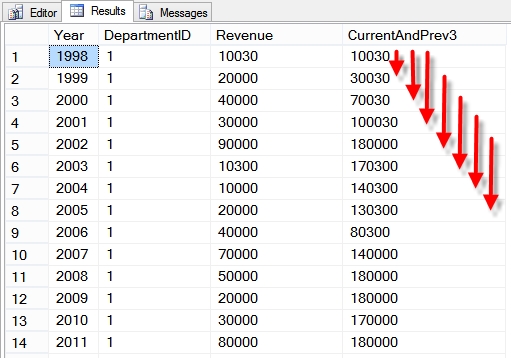
Now the new features, ROWS PRECEDING specifies the the aggregate functions in the current partition in the OVER clause will consider the current row, and a specific number of rows before the current row.


--ROWS PRECEDING
-- look at the sum of revenue over a trailing 3 year period
SELECT Year, DepartmentID, Revenue,
 sum(Revenue) OVER (PARTITION by DepartmentID
 ORDER BY [YEAR]
 ROWS BETWEEN 3 PRECEDING AND CURRENT ROW) as CurrentAndPrev3
FROM REVENUE
ORDER BY departmentID, year;

rows_range_preceding_following4

ROWS FOLLOWING

Now rows following… The ROWS FOLLOWING option specifies a specific number of rows in the current partition to use after the current row.

-- ROWS FOLLOWING
SELECT Year, DepartmentID, Revenue,
 sum(Revenue) OVER (PARTITION by DepartmentID
 ORDER BY [YEAR]
 ROWS BETWEEN CURRENT ROW AND 3 FOLLOWING) as CurrentAndNext3
FROM REVENUE
ORDER BY departmentID, year;

rows_range_preceding_following5

Both PRECEDING and FOLLOWING

Using both ROWS PRECEDING and ROWS FOLLOWING allows you to do things like calculate an average including the current year and years both before and after the current year.


--ROWS PRECEDING AND FOLLOWING

SELECT Year, DepartmentID, Revenue,
 sum(Revenue) OVER (PARTITION by DepartmentID
 ORDER BY [YEAR]
 ROWS BETWEEN 1 PRECEDING AND 1 FOLLOWING) as BeforeAndAfter
FROM REVENUE
ORDER BY departmentID, year;

rows_range_preceding_following6

UNBOUNDED

UNBOUNDED PRECEDING tells the windowing function and aggregrates to use the current value, and all values in the partition before the current value.

-- ROWS UNBOUNDED PRECEDING
SELECT Year, DepartmentID, Revenue,
 min(Revenue) OVER (PARTITION by DepartmentID
 ORDER BY [YEAR]
 ROWS UNBOUNDED PRECEDING) as MinRevenueToDate
FROM REVENUE
ORDER BY departmentID, year;

rows_range_preceding_following7

When using UNBOUNDED FOLLOWING as follows, this means the use the current row, and consider all rows after the current row in the current partition.

-- ROWS UNBOUNDED FOLLOWING
-- http://stevestedman.com/?p=1485
SELECT Year, DepartmentID, Revenue,
 min(Revenue) OVER (PARTITION by DepartmentID
 ORDER BY [YEAR]
 ROWS BETWEEN CURRENT ROW AND UNBOUNDED FOLLOWING) as MinRevenueBeyond
FROM REVENUE
ORDER BY departmentID, year;

rows_range_preceding_following8

ROWS vs RANGE

ROWS vs RANGE appears to cause much confusion.

ROWS means the specific row or rows specified, and RANGE refers to those same rows plus any others that have the same matching values.

Here is an example of ROWS and RANGE producing the exact same results because the years and department IDs don’t have any duplicates. In this case the ROWS and RANGE are identical.

-- ROWS vs RANGE UNBOUNDED PRECEDING

SELECT Year, DepartmentID, Revenue,
 sum(Revenue) OVER (PARTITION by DepartmentID
 ORDER BY [YEAR]
 ROWS UNBOUNDED PRECEDING) as RowsCumulative,
 sum(Revenue) OVER (PARTITION by DepartmentID
 ORDER BY [YEAR]
 RANGE UNBOUNDED PRECEDING) as RangeCumulative
FROM REVENUE
WHERE year between 2003 and 2008
ORDER BY departmentID, year;

rows_range_preceding_following9

Now if we consider the same query of ROWS vs RANGE with duplicate values. Here we insert a duplicate set of values for 2005, and the results below show that for the year 2005 there are two rows in the result set, and the RowsCumulative column is different form the RangeCumulative.  The rows counts the specific rows it the aggregate calculation, the range counts the current row, plus the other 2005 rows for that department id.

-- INSERT A DUPLICATE VALUE FOR RANGE UNBOUNDED PRECEEDING

INSERT INTO REVENUE
VALUES (1,10000,2005),(2,20000,2005),(3,30000,2005);

-- same query as above
SELECT Year, DepartmentID, Revenue,
 sum(Revenue) OVER (PARTITION by DepartmentID
 ORDER BY [YEAR]
 ROWS UNBOUNDED PRECEDING) as RowsCumulative,
 sum(Revenue) OVER (PARTITION by DepartmentID
 ORDER BY [YEAR]
 RANGE UNBOUNDED PRECEDING) as RangeCumulative
FROM REVENUE
WHERE year between 2003 and 2008
ORDER BY departmentID, year;

rows_range_preceding_following10

Summary

With all the great new features in SQL Server 2012, the windowing functions, ROWS and RANGE, PRECEDING and FOLLOWING updates to the OVER clause are a great addition.

Select Favorite SQL Server 2012 Articles

The following articles are a collection of my favorite SQL Server related posts over the last 6 months.

3 Steps to Work More Efficiently in SSMS. Posted 2/17/2013

Recently the 3 Steps to Work More Efficiently in SSMS article was one of my favorites. The three steps were:

  1. Display results in a separate tab.
  2. Hotkey for SELECT TOP 100 * FROM …
  3. sp_help by using Alt+F1

The Display results in a separate tab is one of the first things I do when working in SSMS on a new computer.

VARCHAR diff function Posted 2/13/2013

What made the VARCHAR diff function posting one of my favorite was how it built on a number of previous articles to finally get to something that was much more useful, all based on common table expressions. The VARCHAR diff function used code from a previous posting called Using a CTE to Split a String Into Rows with Line Numbers. A couple weeks after writing the VARCHAR diff function with CTE’s I ended up using this on a project to create an automated testing script to compare the output from an outdated code project to the results from the new T-SQL implementation.  The use of the VARCHAR diff function allowed for a single tester to test the work of 3 developers in a time far less than what was anticipated on this project.

The VARCHAR diff function probably isn’t something that anyone would use on a daily basis, but it is a massive time saver when needed.

TSQL 2012 – Generating letters with a SEQUENCE object Posted 11/9/2012

This article was a lot of fun. Having learned about how to use a SQL Server 2012 sequence object to generate letters at a SQL Saturday presentation, I just had to blog about this one. It was a fun post.

Adventureworks2012 data to Google GeoChart Visualization Posted 10/19/2012

On this article I pulled address data from the AdventureWorks2012 database, and covered how to extract it and reformat it correctly to display on the Google GeoChart Visualizations.

Visualization1

Again another fun posting.

I hope everyone enjoys these as much as I did.

T-SQL 2012 Procedure sp_describe_first_result_set

SQL Server 2012 adds a new stored procedure called sp_describe_first_result_set.  This new procedure returns metadata for the result set returned from a query. The metadata is information about what the results will look like.  sp_describe_first_result_set is an alternative to sp_columns, and appears to perform much better than sp_columns. The information here has been extracted from my SQL Saturday presentation on Whats New in TSQL 2012.

Setting up the database

For the purpose of this demo, we will be using the following database called tsql2012 from my SQL Saturday presentation on Whats New in TSQL 2012.  If you don’t want to use the tsql2012 database, you can use any database you like.


USE [Master];

CREATE DATABASE [tsql2012];

GO

USE [tsql2012];

Once the database is established we can run the following queries to set up a test table to work with, then we run a select statement to view the table contents:


CREATE TABLE MyTable
(
[DepartmentID] int,
[Revenue] int,
[Year] int,
[Name] varchar(1024)
);

insert into MyTable
values (1,10030,1998, 'xyz'), (2,10,1999, '10'), (3,20,2000, '20 Things');

SELECT * FROM MyTable;

sp_describe1

We can see the results are pretty simple, 3 rows with 4 columns from a very simple table.

Calling sp_describe_first_result_set

Next lets take a look at the most simple form of the sp_describe_first_result_set procedure. Here we are passing in a single NVARCHAR parameter containing a query.


exec sp_describe_first_result_set N'SELECT * FROM MyTable';

sp_describe2

In the above result set there are many columns returned, scrolling to the right will show that many of the columns are null, we will come back to that in a minute.  Here you can see several columns with various details about the results that would be returned from the query. We can see the sizes, the types, the precision, collation, and several other details.

Parameterized Queries

Next lets expand on the basic function with the parameterized query version of the stored procedure call.

[SQL]
– sp_describe_first_result_set with parameters
exec sp_describe_first_result_set
@tsql = N’SELECT * FROM MyTable WHERE Name = @name’,
@params = N’@name varchar(1024)’;

[/SQL]

sp_describe3

In this example the results returned were exactly the same as the previous example, however the parameters passed into the stored procedure allowed for parameterized queries. Specifically specifying in this case that the @name parameter is a varchar(1024) type.

Browse_Information_Mode

Next we add a third parameter called browse_information_mode which is used to specify the columns and result type to be included in the output. There are 3 options for this parameter; 0 for no additional data, 1 to analyze for browse which includes additional results, and 2 meaning to analyze as though it was preparing a cursor.


--@browse_information_mode
-- analyzed with no additional information
exec sp_describe_first_result_set N'SELECT * FROM MyTable WHERE Name = @name',
 N'@name varchar(1024)',
 0;

-- analyzed FOR BROWSE
exec sp_describe_first_result_set N'SELECT * FROM MyTable WHERE Name = @name',
 N'@name varchar(1024)',
 1;

-- analyzed as if it was preparing a cursor
exec sp_describe_first_result_set N'SELECT * FROM MyTable WHERE Name = @name',
 N'@name varchar(1024)',
 2;

When the three calls to the stored procedure are run we see three result sets, that are very similar:

sp_describe5

However the third result set analyzing it as a cursor shows an extra column called ROWSTAT that is used internally as part of a cursor.  Where we see the real differences are if we scroll the results to the right as shown below:

sp_describe6

Here you can see in the red rectangle that the 2nd and third calls to the sp_describe_first_result_set stored procedure return more details about the database, schema, table, and column names than the first call did.

Views

The sp_describe_first_result_set stored procedure can be used to examine the result from a query that is selecting from a view in a simliar fashion to what we covered here selecting from a table.

Summary

The sp_describe_first_result_set stored procedure can be called with a single parameter of just a query. In this case it defaults to no parameters, and to no additional information. The sp_describe_first_result_set stored procedure can also be called with two parameters, where the second parameter is the parameterized query information, which will return the similar results to the first call.

An optional third parameter called browse_information_mode can be used to to get additional details in the result set.

Just another new feature in SQL Server 2012.

What twitter hash tags do you follow for SQL Server?

#

The key to twitter is to follow the right hash tags.  What hash tags do you follow related to Microsoft SQL Server? Here are a few of the twitter hash tags that I follow:

#SQLServer

The generic SQL Server hash tag. Most anything goes on this hash tag.

#SQLHelp

The #SQLHelp hash tag is great when you need to get a question answered. May experts follow this hash tag and answer a wide variety of SQL Server questions. There are some general rules about not spamming this hash tag, and keeping it a pure Q and A mechanism.

#SQLPass

General discussion about PASS and PASS events. When a major PASS event is happening there is a lot of activity on this hash tag.

#SQLSaturday

General discussion about SQL Saturday events.

#SQLSatXXX where XXX is a number

Discussion about a specific SQL Saturday event.

#SQLFamily

Discussion between those who are part of the worldwide SQL Family… Those who thrive on SQL Server on twitter, and in the world at large.

#SSRS

Questions, answers and news about SQL Server Reporting Services.

#SSMS

Questions, answers, news, and gripes about SQL Server Management Studio. It’s common to read things like “lost all my work when SSMS locked up on me”.

What SQL Server hash tags do you follow?  Please post a comment with your favorite SQL Server related hash tag on twitter.  

Thanks, and keep on tweeting.