Backups
The backups page allows you to select from the dropdown “Full”, “Differential”, or “Log” to see how your backups are trending over time.
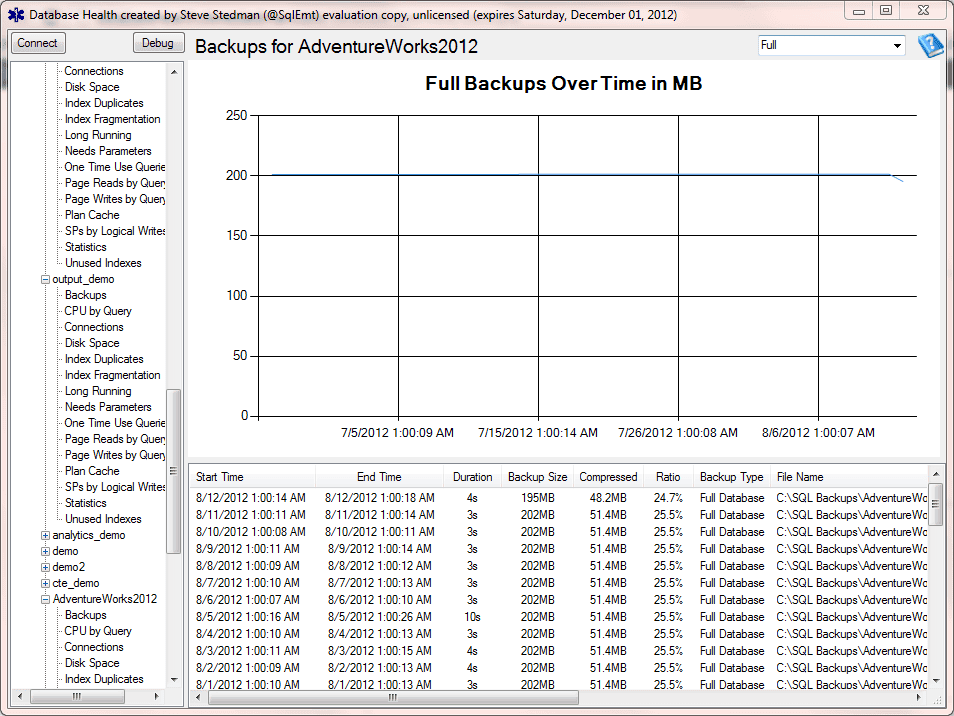
If you are using the Database Health reports to defragment some large indexes, you would expect that when those were defragmented that the next full backup would be smaller, and that the log and/or differential backups would be larger based on the amount of change associated with defragmenting the index.
The backups report can be used to help plan system growth and database backup sizes. You can use the backup report to determine the frequency of full backups, incremental backups and log backups.
Types of SQL Server Backups
Full
Full backups in SQL Server take a complete picture of the entire database. To restore the entire database all you need is just the full backup.
Differential
Differential backups are a copy of all the changes to the database since the last full backup. To restore a differential, you must first restore the full backup, then apply a single differential backup.
Transaction Log
Transaction log backups contain a backup of all of the changes since the last transaction log backup. In order to restore a database to a point in time, transaction logs are usually your best option, but the do require more work.
The way to get a database restore of a transaction log is to do the following:
1. Apply the last full backup prior to the point in time.
2. If you are using differential backups, apply the last differential backup prior to the point in time.
3. Apply all the transaction logs in the right order from the last full (or last differential if using differential backups).
Here is an example of a backup restore script created with the Database Health Reports backup advisor:
use [master];
ALTER DATABASE AdventureWorks2012 SET SINGLE_USER WITH ROLLBACK IMMEDIATE;

RESTORE DATABASE AdventureWorks2012
   FROM DISK = 'C:\Backups\AdventureWorks2012_09_03_010003_9840657.bak'
   WITH REPLACE, NORECOVERY;
RESTORE DATABASE AdventureWorks2012
   FROM DISK = 'C:\Backups\AdventureWorks2012_09_03_123006_2581403.dif'
   WITH NORECOVERY;
RESTORE DATABASE AdventureWorks2012
   FROM DISK = 'C:\Backups\AdventureWorks2012_09_03_160006_7308461.trn'
   WITH NORECOVERY;
RESTORE DATABASE AdventureWorks2012
   FROM DISK = 'C:\Backups\AdventureWorks2012_09_03_200003_0942710.trn'
   WITH NORECOVERY;

RESTORE DATABASE AdventureWorks2012 WITH RECOVERY;

ALTER DATABASE AdventureWorks2012 SET MULTI_USER;
You can get to the Backups Advisor by double clicking on one of the backups in the list of backups at the bottom of the report.
See Also
Enroll Today!


Steve and the team at Stedman Solutions are here for all your SQL Server needs.
Contact us today for your free 30 minute consultation..
We are ready to help!
 Download this page in PDF format
Hello,
I would live to report an issue with your backup display on Database Health Monitor. The list of backups only shows transactional log backups. When I filter by Full or Differential backup, the list is blank. Is this know issue of am I missing something?
Thanks,
That is unusual, and I haven’t seen that issue before. Are you doing full and differential backups with standard SQL Server backups, or are they being done by Veeam or some third party tool?
-Steve Stedamn
Is there a way to get the restore script from backups using the UNC path instead of url ?
this \\servername instead of https :\\…..
Could you provide more details? Not sure exactly what you are seeing?
-Steve Stedman