Common Table Expressions are a great way to simplify complex derived table queries. If it makes sense to break out one derived table or subquery into a CTE, it can make sense to do multiple CTE’s.
To use multiple CTE’s in a single query you just need to:
- Finish the first CTE
- Add a comma
- Declare the name and optional columns for the next CTE
- Open the CTE query with a comma
- Write the query
- And access it from a CTE query later in the same query or from the final query outside the CTEs.
-- First CTE
;WITH fnames (name) AS
(SELECT 'John' UNION SELECT 'Mary' UNION SELECT 'Bill'),

-- Second CTE
minitials (initial) AS
(SELECT 'A' UNION SELECT 'B' UNION SELECT 'C'),

-- Third CTE
lnames (name) AS
(SELECT 'Anderson' UNION SELECT 'Hanson' UNION SELECT 'Jones')

-- Using all three
SELECT f.name, m.initial, l.name
FROM fnames f
CROSS JOIN lnames AS l
CROSS JOIN minitials m;
Another way that this could be done using SQL Server 2008 or newer is with the row constructor instead of the UNIONs inside of each CTE.
SELECT x FROM (VALUES ('Anderson'), ('Hanson'), ('Jones')) f(x);
This type of row constructor syntax is often used in INSERT statements, but it can also be used in a CTE as shown here:
;WITH Fnames (Name) AS
(SELECT x FROM (VALUES ('John'), ('Mary'), ('Bill')) f(x) ),
Minitials (initial) AS
(SELECT x FROM (VALUES ('A'), ('B'), ('C')) f(x) ),
Lnames (Name) AS
(SELECT x FROM (VALUES ('Anderson'), ('Hanson'), ('Jones')) f(x) )
SELECT F.Name AS FirstName, m.initial, l.Name AS LastName
FROM Fnames F
CROSS JOIN Minitials as m
CROSS JOIN Lnames as L;
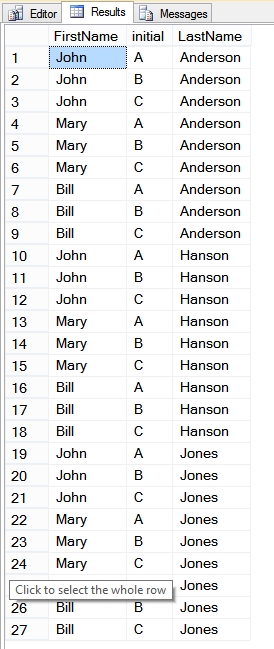
Which produces the following output.

Download my book for FREE when you sign up for my mailing list.
More from Stedman Solutions:

Steve and the team at Stedman Solutions are here for all your SQL Server needs.
Contact us today for your free 30 minute consultation..
We are ready to help!
Great areticle for a quick reference I’ve used this before and my memory wasn’t working today so thanks for setting me straight.
i have three cte and out of three i need to select any one as per the choice sent from user.